Colorful Character Art Studio

Colorful Character Art Studio

Developer: Xtreme Fun Labs
Published: 2025-06-17
Updated: 2026-07-30
Kids Educational Creative
Advertisement

Reviews

This browser-based coloring activity offers a calm, pressure-free environment for creative expression. The wide color palette encourages experimentation, while the undo and reset tools let children learn without frustration. The ability to save and share finished artwork adds a social dimension. It is an excellent choice for parents seeking a constructive, screen-based activity that promotes fine motor skills and color recognition.

About This Game

Getting Started with Coloring

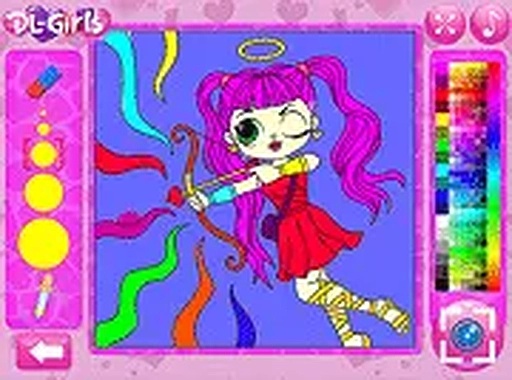
This online activity presents a selection of character outlines waiting for color. Each outline features distinct sections that can be filled individually. The interface places a color palette on the screen, allowing you to pick shades and apply them to any area with a simple click or tap. There is no setup or account creation required, making it easy to begin immediately.

Creative Freedom and Tools

The color palette offers a broad range of hues, from bright primaries to softer pastels. You can switch between colors as often as you like, experimenting with different combinations on each section. If a choice does not work out, an undo option lets you reverse the last action. A reset function clears the entire drawing, giving you a fresh start. These tools encourage exploration without fear of mistakes.

Designed for Relaxed Play

This activity removes common pressures found in many digital games. There are no timers, scores, or levels to advance through. You decide how much time to spend on each piece. The environment is calm and supportive, making it suitable for quiet afternoons or shared family moments. The simple controls ensure that even those new to computers can participate independently.

Sharing Your Creations

Once a character outline is fully colored, you can capture the result. A screenshot function saves your artwork to your device. From there, you can share it with family and friends through email or social media. This feature turns a personal activity into a way to connect with others, celebrating each unique creation.

Accessibility Across Devices

The activity runs directly in a web browser on desktop computers, tablets, and smartphones. No software installation or download is necessary. The interface adapts to different screen sizes, ensuring a consistent experience whether you are using a mouse or touch input. This flexibility allows you to color wherever you are.

Compatibility

Play on Any Device | Chrome / Safari / Edge Recommended

Faq

Is Colorful Character Art Studio free to use?
Yes, the entire activity is free to access through your web browser. There are no hidden charges or in-app purchases. You can color as many character outlines as you like without any cost.
Do I need to create an account to save my artwork?
No account is required. The screenshot feature saves the image directly to your device. You can then share or store it as you wish without any registration process.
Can I use this activity on a tablet or phone?
Absolutely. The interface is designed to work on touchscreens as well as with a mouse. It functions smoothly on tablets, smartphones, and desktop computers through any modern web browser.
What age group is this coloring activity best for?
The simple controls and lack of time pressure make it suitable for children as young as three or four years old. Older kids and adults who enjoy creative pastimes will also find it relaxing.
How many character outlines are available to color?
The activity includes a selection of different character outlines. Each one has its own unique shape and sections to fill. New outlines may be added over time.
Can I undo a color I applied by mistake?
Yes, there is an undo button that reverses the most recent action. You can also reset the entire drawing to start over. This makes it easy to correct any errors.

Comments

0 comments
U
User
Loading comments...

Similar Games