
A Browser Coloring Activity
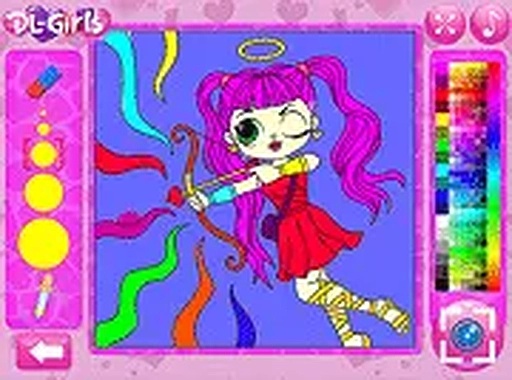
Colorful Character Art Studio runs directly in a web browser on desktop computers, tablets, and smartphones. No download, installation, or account creation is required, so the activity starts as soon as the page loads. The interface adapts to different screen sizes and supports both mouse and touch input, which keeps the experience consistent whether you are coloring at a desk or on a phone.
How Coloring Works
Each character outline is divided into distinct sections that can be filled individually. A color palette sits on the screen, offering a broad range of hues from bright primaries to softer pastels. You select a shade and apply it to any section with a simple click or tap. Colors can be switched as often as you like, so the same outline supports many different combinations.
Undo, Reset, and Starting Over
If a color choice does not work out, an undo option reverses the last action. A reset function clears the entire drawing and gives you a fresh start. These tools remove the fear of making a mistake, because any section can be changed or wiped clean without losing the rest of the artwork.
No Timers, Scores, or Levels
The activity deliberately removes common pressures found in many digital games. There are no timers, scores, or levels to advance through, and you decide how much time to spend on each piece. The environment is calm and supportive, making it suitable for quiet afternoons or shared family moments. The simple controls allow even those new to computers to participate independently.
Saving and Sharing Finished Art
Once a character outline is fully colored, a screenshot function saves the result to your device. From there, you can share it with family and friends through email or social media. This turns a personal activity into a way to connect with others and celebrate each unique creation.






Editorial Notes