
Designing the Network
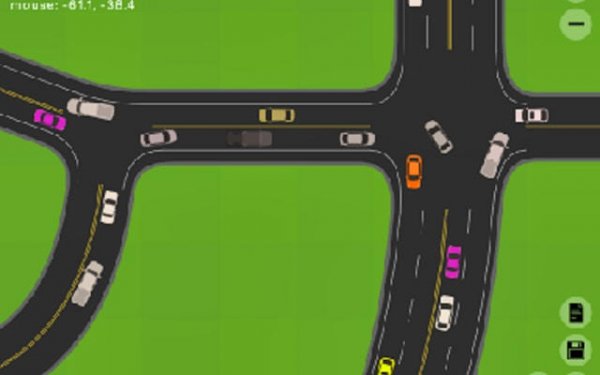
Road Designer: Traffic Simulator hands you an editor and a blank slate. You place roads, intersections, and highways, using grid snapping to keep angles clean and smooth camera controls to inspect your work from any angle. The goal isn't to decorate a city; it's to build a road network that functions under pressure. Every layout decision, from lane width to intersection spacing, directly affects how traffic behaves later.
Watching AI Traffic Respond
Once your roads are laid, AI-driven vehicles begin navigating them in real time. They don't follow scripted paths; they react to the network you built. If a junction is too tight or a highway feeds into a bottleneck, you'll see it happen. This turns the simulation into a feedback loop: build, observe, adjust. The congestion you spot is the game telling you where your design logic broke down.
Driving Your Own Roads
Sometimes a bird's-eye view hides the problem. The game lets you take direct control of a vehicle and drive through your city from a driver's viewpoint. This hands-on perspective reveals awkward merges, confusing signage, or sharp turns that look fine from above but feel wrong behind the wheel. It's a practical testing tool rather than a separate driving mode.
Sharing and Iterating
Designs save as simple text strings, which you can share with friends or the online community. That makes comparing layouts easy and encourages iteration. The game is free to play and runs on touch screens, so it works for short sessions or extended planning. There's no campaign or scoring system mentioned; the reward is a smoother traffic flow and a network that holds up under scrutiny.






Editorial Notes