
Quick-Match Scoring and Escalating Pace
Every round in Table Tennis Rally Challenge ends at three points, so matches stay short and easy to fit into a break. The compact format also lets you chain several rounds together without committing to a long session. As a rally continues, the ball picks up speed, forcing you to adjust your timing mid-exchange. That acceleration is the game's main pressure source: the longer you keep a point alive, the less margin you have for late reactions. Steady concentration matters more than aggressive shot selection, because a single mistimed return can decide a three-point round.
Controls That Work on Touch and Keyboard
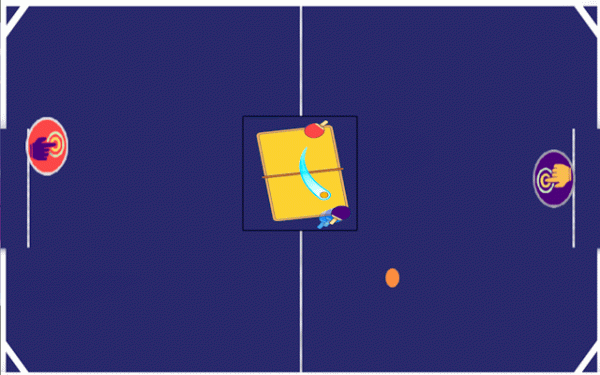
The control scheme is deliberately simple. On mobile, tapping the left or right side of the screen slides your paddle horizontally. On a computer, Player 1 uses the Q and D keys, while Player 2 uses the Left and Right Arrow keys. New players can start moving the paddle within seconds, but the same inputs still allow precise placement once you learn how far the paddle travels per tap or key press. The visual layout keeps the ball and paddle prominent, so there is little on screen to distract from tracking the ball.
Adaptive AI and Same-Device Multiplayer
Single Player mode pits you against a computer opponent that changes its approach based on how you play. That adaptation keeps solo sessions from becoming predictable and gives you a consistent partner for practicing timing and aim. Two Player mode moves the competition to a single device, with each person controlling a paddle. Both modes use the same three-point round structure, so moving between solo and local versus play does not change how a match feels.
Reading Opponents and Building Consistency
Winning points depends on watching where your opponent is positioned and choosing a return that makes the next shot harder. Because the ball speeds up, staying calm and keeping your eyes on it becomes more important as a rally extends. Repeated play teaches you the paddle's movement range and sharpens your reaction time. The computer opponent can reveal patterns in its positioning over time, while a human opponent in local multiplayer introduces less predictable shot choices. Both routes reward the same core skill: placing the ball where your opponent is not.




Editorial Notes