
Reading the Board Through Numbers
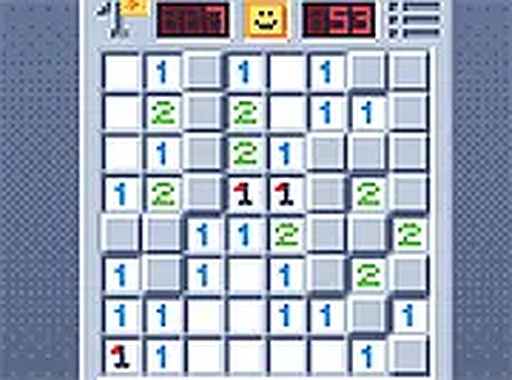
Every tile you uncover in Number Clue Logic Grid displays a single digit. That number counts how many hazards sit in the eight squares touching it, diagonals included. The digit is the only information the game gives you, and it is enough. From each clue you can mark some neighbours as safe and others as suspect, then use the next revealed number to narrow the field further. No move depends on luck; if you guess, you have missed a deduction that was available.
How Difficulty Changes the Board
Three preset levels reshape the same grid. Easy boards carry fewer hazards and wider safe zones, which makes them suitable for learning how the counting works before the clues start overlapping. Medium sits between the two. Hard boards pack more hazards into the same space, so a single digit can refer to several threats at once and every clue needs to be cross-checked against its neighbours. Because each new game generates a fresh layout, the puzzle you solve is never repeated.
Flagging, Timing, and On-Screen Tools
A flagging system lets you mark tiles you believe contain hazards, separating them visually from safe ground. On harder boards, where several clues point at the same square, this becomes the main way to keep track of what you have already ruled out. A built-in timer records how long each puzzle takes and is optional; ignore it if you prefer to work without a clock. Together the two tools support both quick sessions and longer, focused solving.
Pixel Art and Browser Access
The board uses a retro-inspired pixel art style with a restrained colour palette and clear tile borders. Numbers stay legible against the grid, and the lack of visual clutter keeps attention on the clues. The game runs in desktop and mobile browsers with controls that respond to mouse or touch, and a full-screen mode is available for a larger view. No download or account is required, so a puzzle can start within seconds on any device.




Editorial Notes